Bootloaders for AT90USB1286

While the AT90USB1286 MCU in the Teensylu/Printrboard can be programmed with an ICSP or JTAG programmer, you can also install a bootloader, which will allow you to program it via a USB connection alone. Besides the convenience of not having to attach a hardware programmer, uploading firmware via a USB bootloader is blazingly fast. Also, it allows you to write host software to do end user firmware upgrades without a hardware programmer.

I am currently aware of 3 bootloader options for the AT90USB128x MCU’s:

DFU – USB Device Firmware Upgrade Class

This is the bootloader officially supported by Atmel.

PRO: Works with Atmel FLIP tool.

CON: requires libusb device driver; no command line tool available for Windows.  For Linux, an open source host loader app is available; can’t integrate into Arduino IDE

CDC – USB Communication Device Class

PRO: can integrate into Arduino IDE; works with avrude via avr109 protocol.

CON: requires user to know which virtual serial port it’s associated with; in Windows, uses native Windows driver, but requires INF file install, needs upgrade of avrdude to newer version for Arduino < 1.0.

HID – USB Human Interface Device Class

PRO:  Trouble free – doesn’t require any device drivers – just plug and play

CON: doesn’t integrate into Arduino IDE


Fuse Settings

Before you can install a bootloader on your MCU, you must set the fuses correctly to allocate space for it.  We need 4K bytes (2K words) of space, so using the Engbedded Atmel Fuse Calculator, we see that we need Boot Flash Size BOOTSZ=01,  which is in the high fuse.  Here are the fuse settings that I use on mine:

avrdude -c usbtiny -p at90usb1286 -U lfuse:w:0xde:m -U hfuse:w:0xdb:m -U efuse:w:0xf0:m

BE CAREFUL IF YOU WANT TO FIDDLE WITH FUSE SETTINGS YOURSELF.  It’s not hard to “brick” your AVR with the wrong settings.  In fact, when I was first working with my Printrboard, I managed to brick it by messing up the CKSEL bits, thinking I was supposed to set it for an external oscillator.  Luckily, all I had to do was connect an external oscillator (I used the signal generator function of my DSO Quad mini scope) to XTAL1 and then use avrdude to fix the offending fuse.  If you do something worse, like disabling SPIEN by accident, you might have to resort to HV programming.  Here is some info on recovering a bricked AVR:  http://www.larsen-b.com/Article/260.html

Note that I have set hfuse = 0xdb, which disables the JTAG interface.  This makes more I/O pins available (in particular, some of the pins exposed on the I/O headers of Printrboard).  If you want to use a JTAG programmer, you should instead set hfuse = 0x9b.

Once your fuses are set correctly, use avrdude with your programmer to upload the bootloader.  After your bootloader is installed, you don’t need to use the programmer anymore – just a USB connection is enough.

Booting into Bootloader

Once a bootloader is installed (see instructions below), the bootloader must be activated when you want to upload firmware.  To boot the AVR into the bootloader instead of normal program code, you must tie the HWB pin to ground during a RESET pulse.  To to this on Teensylu or Printrboard, simply remove the 2-pin jumper that’s next to the AT90USB1286 chip, then press and release the reset button.  You can then replace the HWB jumper.

NOTE: If you have a Printrboard RevD, the jumper has been reversed, and needs to be INSTALLED to get into the bootloader, and REMOVED to run your firmware.

Below, I describe how to install and use each of the bootloaders.  For Arduino IDE integration, use BootloaderCDC.  I also like BootloaderHID, because it doesn’t need drivers, and doesn’t require selecting a virtual serial port.

DFU Bootloader

  1. Download and install FLIP. FLIP will also install the device driver.
  2. Download BootloaderDFU.zip. I built this one for AT90USB1286 from LUFA-120219.
  3. Install with avrdude: avrdude -c usbtiny -p at90usb1286 -U flash:w:BootloaderDFU.hex:i (note if using a usbtiny and avrdude complains of a verification error at byte 0x1f000, ignore it)
  4. To flash hex files to board, after Booting into Bootloader, use FLIP or dfu-programmer.

CDC Bootloader

  1. Download BootloaderCDC.zip.  I built this one for AT90USB1286 from LUFA-120219.
  2. Install with avrdude: avrdude -c usbtiny -p at90usb1286 -U flash:w:BootloaderCDC.hex:i (note if using a usbtiny and avrdude complains of a verification error at byte 0x1f000, ignore it)
  3. To flash hex files, you’ll need a newer version of avrdude than the one included with Arduino < v1.0.  The version I use is 5.10.  After Booting into Bootloader (the first time, Windows might want a driver … point it to the INF file that I included) , type:  avrdude -c avr109 -P port -p at90usb1286 -U flash:w:firmware.hex:i, substituting your Printrboard’s CDC serial port for port, and the name of your hex file for firmware.hex.
  4. If you want to flash directly from the Arduino IDE, follow my instructions for installing my at90usb1286txt.zip files into Arduino.  Then, after restarting Arduino and Booting into Bootloader, select [BootloaderCDC]Teensylu/Printrboard from the Arduino Tools->Board menu.  Then select the serial port associated with your board.  Hit the Upload button in the Arduino IDE to compile and upload your sketch.

HID Bootloader

  1. Download BootloaderHID.zip. I built this one for AT90USB1286 from LUFA-120219.
  2. Install with avrdude: avrdude -c usbtiny -p at90usb1286 -U flash:w:BootloaderHID.hex:i (note if using a usbtiny and avrdude complains of a verification error at byte 0x1f000, ignore it)
  3. To flash hex files, after Booting into Bootloader, type:  hid_bootloader_cli -mmcu=at90usb1286 -w -v firmware.hex, substituting the name of your hex file for firmware.hex.  I’ve included the Windows binary.  For Linux or OSX, you can build hid_bootloader_cli yourself from the LUFA sources.

NOTE: When uploading a bootloader to the AT90USB1286 using a USBtinyISP, you will get a verify error from avrdude.  You can safely ignore it.  The problem is that the USBtinyISP has a bug with reading flash memory above the 64K (10000h) boundary.  However, it can write it without problems.
grbl CNC Firmware Ported to Printrboard

If you want to use your RepRap for CNC use, such as milling PCB’s, regular 3D printing firmwares might not be ideal. For instance, Marlin is not able to handle the slow step rates used for CNC work.

I have ported grbl, a firmware specifically for CNC use (from which Marlin derived its acceleration routines), to Printrboard and Teensylu. You can download it from my fork at: https://github.com/lincomatic/grbl.

Repetier Firmware Now Runs on Printrboard

I spent this past weekend porting Repetier-Firmware to Printrboard and Teensyduino. It took me a while to get it working properly, because the code intermixes calls to fastio and Arduino, and the pin definitions in fastio.h were different from the Teensyduino Arduino library. It is now working pretty well, so Printrboard and Teensylu users now have yet another option for RepRap firmware. I’ve already submitted my changes to Repetier, and he’s merged them into his code. Download it here: https://github.com/repetier/Repetier-Firmware.

In case you haven’t tried it, Repetier also has an interesting host program, Repetier-Host, which works with other firmwares as well as Repetier-Firmware.

Ktone Travel Electric Guitar Review

I’ve been looking for a compact guitar to take with me on road trips, camping, and to play when I’m killing time waiting for my kids at their various lessons in my car. After much research on the Internet, I narrowed it down to either the Washburn Rover or the Hofner Shorty. The Rover looks like a great buy at $125. It gets great reviews, and comes with a very nice soft shell case. For $119, the Shorty, on the other hand, only comes with a cheap gig bag. I was really itching to get the Rover, but after pondering it for a long time, decided that an electric guitar was more appropriate because: 1) it will hold up better in heat/cold/humidity sitting in my car on road trips and 2) it can be played silently in hotel rooms without bothering the rest of the family.

While searching for a good price on the Hofner Shorty, I came across a much cheaper knockoff on eBay – the Ktone Travel Electric Guitar. It looks so identical to the Shorty that many people have hypothesized that they’re made in the same factory. At $69.99 including shipping, it’s $50 cheaper than the Shorty – so much cheaper that my interest was piqued. The Ktone got good reviews at Ultimate-Guitar and some other discussion sites. It turns out that there are several clones of the Shorty in the wild, if you search long enough.

Planet-Z posted a scathing review of the Ktone, complete with photos and a video. The guitar that .. reviewed was a disaster, with loose/unusable tone pot, mismatched wood on the neck, and terrible fretwork.That put me off so much that I was ready to buy a real Hofner Shorty, until I read a comment on the Planet-Z review from someone who bought a real Hofner Shorty, and found it to also be of bad quality. Unfortunately, none of the stores near me have Shortys for me to try out, so I decided to just take the plunge and try the Ktone first, since it has a 30 day money back guarantee (minus shipping charges).

I bought the Ktone Travel Electric Guitar from eBay seller kukufashion. Interestingly, my Paypal receipt showed the recipient as none other than Ktone Corp.!

The guitar comes with a crappy gig bag that looks identical to the Shorty’s and a crappy guitar cable that’s basically a thowaway.

When first opened up the package, I had mixed feelings. The color was metallic blue like the Shorty, unlike the baby blue pictured in the eBay listing. The neck on mine didn’t have an awful looking join @ the headstock like the one that Planet-Z got. Instead, it had some strange colored grain at the other end, and what looks like melted polyurethane. The strange grain is actually growing on me.. kind of like curly maple.

The body’s finish looked decent, and the controls were all installed properly and had smooth action. Thankfully, mine didn’t have the poorly seated frets with sharp ends like Planet-Z’s copy, but although it’s playable, the frets are in dire need of leveling and polishing. The guitar looks like a Hofner Shorty factory reject. Except for the body, the finish work is horrible. The back of the neck has sanding marks, there are various dents and scrapes all over the place, and even the bridge has cosmetic defects. However, I was thinking most of the defects were cosmetic, and what do you expect for $70?

I tuned it up and plugged it in to my amp. The first thing I noticed was that the guitar cable wasn’t clicking in properly to the output jack. It worked fine, but the cable could get tugged out too easily.

The output jack felt like it wasn’t engaging my guitar cable properly, so I took it out to have a look. Amazing… they used such a low grade connector that it didn’t even engage properly with the groove in the 1/4″ TRS plug.
(Notice the extremely thin wiring). OK, not a big deal, and I can always replace the jack easily and cheaply.

The setup of the guitar was terrible, but I’m used to that, even with fancy guitars, so I thought it wasn’t a big deal. The first thing I did was check the neck relief. It wasn’t too bad, so I didn’t adjust the truss rod. Next, I lowered the action. The bridge has so much wiggle in it, and the screws were already screwed in so far that I almost ran out of adjustment lowering the action. Luckily, I was able to get it to a comfortable playing height when I lowered it down to its limit. Not a good sign. I can lower it a bit more by shimming the tailpiece. The slots in the bolts are too big, so the whole bridge/tailpiece tilts up a bit. The frets on the low E and A string need to be leveled a bit past the 14th fret.. there is a lot of buzz there, so I had to raise the action slightly to compensate.

It wasn’t until I started trying to adjust the intonation that I found out what a disaster the guitar really is. The intonation on the low E string was a full 12 cents sharp! No wonder the guitar was impossible to tune! I’ve never gotten a guitar with intonation that far off. First, I tried to adjust the low E string’s saddle, but even when I adjusted it as long as it would go, it was still 12 cents sharp! I was thinking that it was time to pack it up to return to Ktone but then I realized that there are also screws that move the whole bridge backwards. After fiddling with the screws and test the intonation over and over, I finally got it into decent adjustment .. just barely.. to get the low E intonation correct, I had to set the strings to the maximum length.. both the saddle adjustment screw and the tailpiece adjustment screw maxed out. My adjustments lengthened the string by …” Whoever designed the guitar didn’t measure the length of the strings properly. Unfortunately, with the tailpiece adjusted to maximum string length, the G string’s intonation goes flat by 6 cents even when its saddle is adjusted to minimum length. I can’t adjust the tailpiece, because then the low E will go sharp. If I could flip the saddle around, like they way the top 3 strings are, I could shorten the string some more, but the saddle pieces aren’t removable. I am just going to have to live with the G string 6 cents off. Or I could split the difference by making the A & E strings a bit sharp.

One thing that also signals that something is wrong is that the harmonic @ the 12th fret occurs not exactly on top of the 12th fret, but a few mm past it. Something is definitely wrong w/ the positions of the frets on the neck. Despite these issues, after my 2hrs of adjusting the intonation, it sounds a lot better. While the intonation isn’t perfect, it’s acceptable to my ears, especially for a cheap guitar that I’m going to be tossing in the car and taking to the beach. It’s inexpensive enough that I’m not going to cry if it gets stolen or damaged.

After playing with the tuning for a while, I found that the guitar always sounded out of tune, even when I used my Peterson Strobotuner. Something must be wrong with the intonation, I thought.

The single bridge humbucking pickup is pedestrian. It’s not very hot, and the tone is a bit thin, but I was surprised how much effect the tone knob has … makes sound passable. I’ll probably replace it with something better in the future, if I can tolerate the guitar.

The gig bag is cheap, but it doesn’t look any worse than the one that comes with the Shorty. What I hate about gig bags, is that they don’t protect the tuners, so the tuning is always way off when you take the guitar out to play.

So at $69.99 is the Ktone Travel Electric Guitar a good buy? Just barely. If I didn’t have to pay 2-way shipping to return it, I probably would have just returned it. Even if the Shorty has issues, there’s no way that it could possibly be as shoddily built as the Ktone.

Anyway, it serves the purpose I bought it for… a small, light, portable guitar that I can take everwhere and not have to worry about getting ruined or stolen. But I think you should avoid this piece of shit like the plague!

Running Marlin Firmware on a Printrboard

As of this writing, the official version of Marlin firmware from github does not yet work with Printrboard.  Printrboard is a fork of Teensylu, designed by the folks at Printrbot. Printrboard isn’t yet available for purchase, but since the design is open source, anyone can download it and get the PCB’s manufactured themselves. Sprinter is currently the only RepRap firmware works with Teensylu and Printrboard out of the box.  I am now successfuly running Marlin on my Printrboard.  Below is a video of Printrboard virtually printing a Printrbot with Marlin:

Last month, I submitted an issue with ErikZalm to get the compile errors fixed when compiling Marlin for Teensylu.  The main branch of Marlin now compiles for Teensylu by setting MOTHERBOARD = 8.  Unfortunately, this build setting won’t work with Printrboard, because some of the pins are different.  Also, there is a kill function that Marlin calls if it detects certain things like a shorted thermistor, etc… but it’s not able to send the error messages back to the host, so it looks like your board is just dead.
I think Erik is too busy right now getting V1 out the door to deal with making fixes for a couple of not so popular boards, so I’ve forked Marlin on github with my fixes for making it behave nicely with Teensylu and Printrboard.  You can download it here:  lincomatic/Marlin.
——————————–
For Firmware Hackers Only
For those who want to know what’s special about my branch of Marlin, it has to do with the mappings of the I/O pins.  The code in Marlin has two different ways to access digital I/O pins: 1) the Arduino digitalRead/Write() functions 2) fastio – there are macros and pin assignments in fastio.h.  In ErikZalm’s Marlin branch, the pin numbers are different between Arduino and fastio functions, which leads to confusion and bugs.  What I have done is use the digital pin definitions in Teensyduino’s core_pins.h and updated the pins in fastio.h to match them.  This way, a call to digitalRead(28) is equivalent to _READ(28).
EXECEPTIONS:
  1. in pins.h, analog pins use ADC numbering instead of digital pin numbering.  Therefore, even though B_THERM -> F0/ADC0 and E_THERM -> F1/ADC1, we are using them as ADC pins, so B_THERM=0 (ADC0) and E_THERM=1 (ADC1).
  2. Printrboard uses some pins that aren’t supported by Teensyduino, since they aren’t exposed in the Teensy hardware.  Therefore, those pins aren’t listed in core_pins.h.  I have added them to fastio.h, so they are accessible only with fastio macros.  They are digital pins 46 and 47 see the “//– Begin not supported by Teensyduino
    ” section of fastio.h

EXAMPLES:

XSTEP = physical pin 51. Looking at the AT90USB1286 spec sheet, pin 51 = PA0 (AD0)
in core_pins.h, #define PIN_A0 28
in fastio.h,

#define DIO28_PIN PINA0
#define DIO28_RPORT PINA
#define DIO28_WPORT PORTA
#define DIO28_PWM NULL
#define DIO28_DDR DDRA

so in pins.h, X_STEP = 28

X_MIN = AT90USB1286 pin 9 = PE3
core_pins.h doesn’t have a definition for PIN_E3, because the pin isn’t accessible in Teensy++, so we can’t talk to that pin at all with the Arduino functions.  However, it’s in fastio.h:

//– Begin not supported by Teensyduino
//– don’t use Arduino functions on these pins pinMode/digitalWrite/etc
#define DIO47_PIN PINE3
#define DIO47_RPORT PINE
#define DIO47_WPORT PORTE
#define DIO47_PWM NULL
#define DIO47_DDR DDRE

so X_MIN = 47

How to Program an AT90USB1286/Teensylu/Printrboard with Arduino and USBtinyISP

My first step in loading Marlin RepRap firmware into the Printrboard is to get Arduino to play nicely with it.  The method I am going to describe in this article for programming a Printrboard with Arduino will work with the Teensylu or any other device that uses the AT90USB1286 and has an ICSP connector.   The programmer we are going to use is a USBtinyISP or compatible. Since the AT90USB1286 isn’t officially supported by Arduino, it takes a bit of setting up to get things working properly.

I first looked at the instructions on Teensylu’s page in the RepRap wiki, but found them very confusing, and I didn’t like the idea of having to send the HEX file to the MCU using an external utility instead of doing everything within the Arduino IDE. So, I set out to streamline the process and document it as I went.  If you follow my method below, you’ll be able to compile and download your firmware all within the Arduino IDE.

Step 1: Download and install Teensyduino

Teensyduino was created by PJRC for their Teensy line of boards.  Teensy is a great alternative to Arduino if you want an ultra compact board with built in USB.  The Teensy++ happens to also use the AT90USB1286, so it’s compatible w/ Printrboard/Teensylu.  Follow PJRC’s instructions for installation from the download link.

If you only plan to program for RepRap, you don’t need to install any of the libraries.  On Windows, you will be prompted to install the serial driver. Select yes.  You don’t have to worry when Windows complains that the driver is unsigned… it’s just an INF file to tell Windows to use one of its own built-in drivers.

Step 2: Modify Teensyduino Configuration for use with USBtinyISP

Download at90usb1286txt.zip.

Navigate to where your Arduino files are located.  On my computer, I have them in d:\arduino-0022.  We will call this <arduinofolder>.  Now, find the subfolder where the Teensyduino library was installed:

<arduinofolder>\hardware\teensy

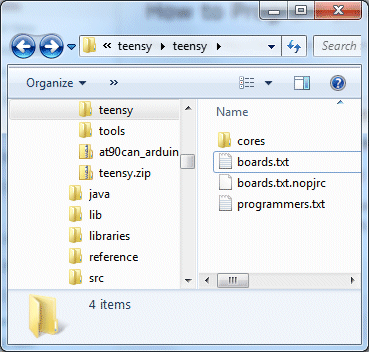
If you are in the correct folder, you should already see a boards.txt and a subfolder called core in there.  Drop the files from at90usb1286txt.zip into that folder, overwriting the existing boards.txt.  You should see something like this:

If you don’t plan to develop with any of PJRC’s Teensy or Teensy++ boards, you can keep them from showing up in your Arduino menu by copying boards.txt.nopjrc over boards.txt.

Now, when you start Arduino, you should see some new configurations in the Tools->Board menu.  The important ones are:

[usbtinyisp]AT90USB1286
[usbtinyisp]Teensylu/Printrboard
[BootloaderCDC]AT90USB1286
[BootloaderCDC]Teensylu/Printrboard

To use a USBtinyISP programmer, select either [usbtinyisp]AT90USB1286 or [usbtinyisp]Teensylu/Printrboard. The only difference between the two configurations is that I took the extra useless options out to make things simpler when programming Teensylu/Printrboard.  The Teensylu/Printrboard option is the same as the AT90USB1286 option with USB Type = Serial and CPU Speed = 16MHz.

At this point, you can plug in your USBtinyISP and into your AT90USB1286/Teensylu/Printrboard and start programming!

So what are the [BootloaderCDC] configurations for?  They allow you to download sketches into your target board directly through a USB connection to your host, without the USBtinyISP programmer.  See my next article for details on how to do that.

Update 20140909: I have uploaded a copy of Arduino 1.0.5-r2 for Windows to github, which is already modified to work with the AT90usb1286, so you don’t have to modify it as above. Simply go to https://github.com/lincomatic/arduino-1.0.5-r2-at90usb1286 and click the Download Zip button, and then extract the contents to your PC. My distribution also supports the USBasp in addition to the USBtinyISP.