Accuracy of Pyle PSWGP405BK vs RunKeeper Revisited

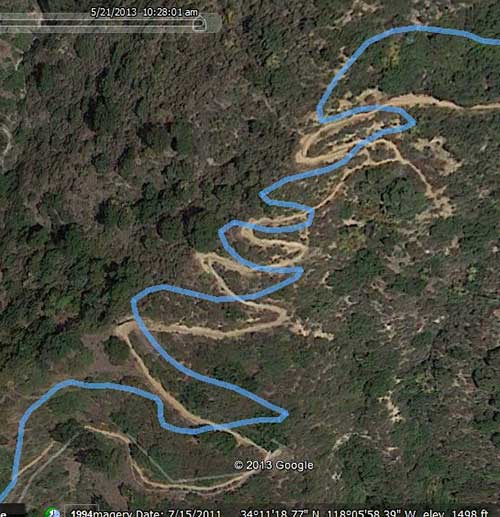
This morning, I repeated my Eaton Canyon loop with the Pyle PSWGP405BK and RunKeeper on the iPhone 4S.  This time, both of them were quite a bit more accurate than on the last hike.

Pyle PSWGP405BK

pyle

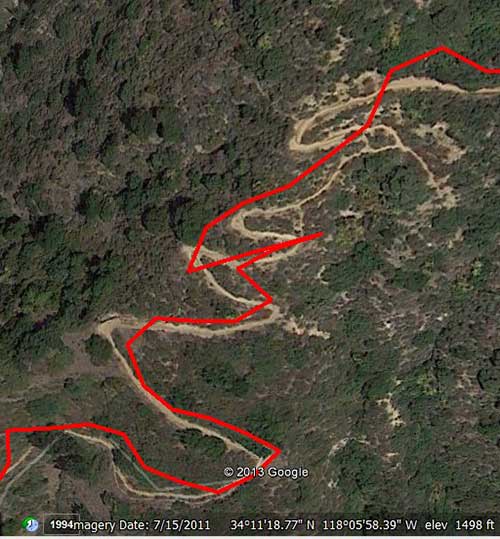
This time round, the Pyle tracks the shapes of the switchbacks fairly accurately, albeit with an offset.  There is a fair amount of overshoot, however, in the last switchback.

RunKeeper on iPhone 4S

rk

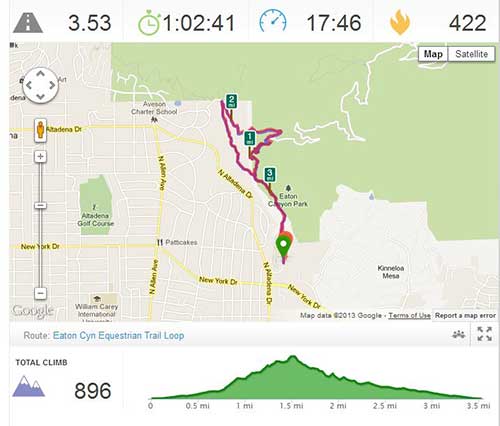
RunKeeper on the iPhone 4S again does much worse than the Pyle, but still much better than in my previous recording.  Out of the various iPhone tracking apps I’ve tried, I still find RunKeeper to be the most accurate.  I would like to try this route with an Android phone sometime, to see if it does a better job with outputting accurate location data. Here’s the tabular data:

Distance (mi) Calories
RunKeeper 3.47 491
Pyle PSWGP405BK 3.31 593
Pyle PSWGP405BK track on RunKeeper.com 3.43 475

Interestingly, the disparity between RunKeeper’s distance calculation of its own track vs its calculation of the Pyle’s track was much smaller today, but this can be explained by the fact that RunKeeper didn’t meander as badly today, so the tracks lined up more closely.

On the other hand, disparity between the results I got today and my previous post show how GPS accuracy can vary, even in similar weather conditions, at a similar timeof day on the same route.  I would conjecture that the increased accuracy today has to do with a more optimal geometry of the satellites in the sky. Unfortunately, since the devices I used don’t output detailed satellite signal and skyview data, there is no way to verify for sure.

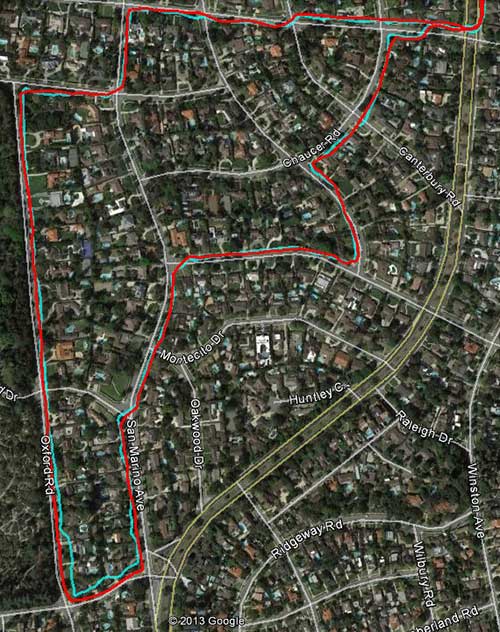
This evening, I again pitted RunKeeper against the Pyle, walking on a very flat route, composed mostly of straight lines. Here are the surprising results:

rkpyle

Distance (mi) Calories
RunKeeper 3.38 381
Pyle PSWGP405BK 3.22 355
Pyle PSWGP405BK track on RunKeeper.com 3.27 354

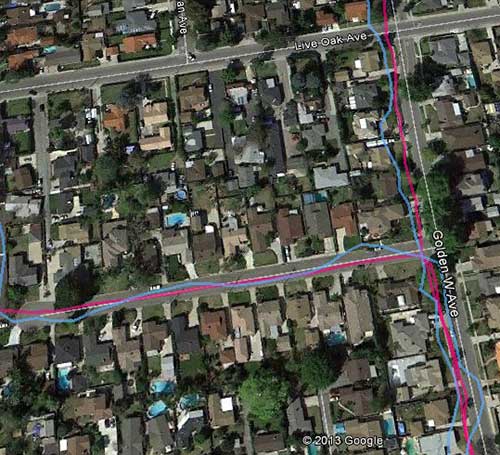
Like this morning, the RunKeeper and Pyle tracks were a lot more similar than on previous days. RunKeeper’s distance was .11mi longer than its calculation of Pyle’s track, which makes sense, because its track was more wiggly, as usual, which adds distance.  But what’s inexplicable is that on this track, the difference between the Pyle’s own distance calculation versus RunKeeper’s calculation of its track is only .05mi, only 1.5%.  Contrast that to this morning’s hike, where the difference was .12mi or 3.6%.

Previous Related Post:  Accuracy of Strava vs RunKeeper vs Pyle PSWGP405BK vs Garmin Forerunner 10


Accuracy of Strava vs RunKeeper vs Pyle PSWGP405BK vs Garmin Forerunner 10

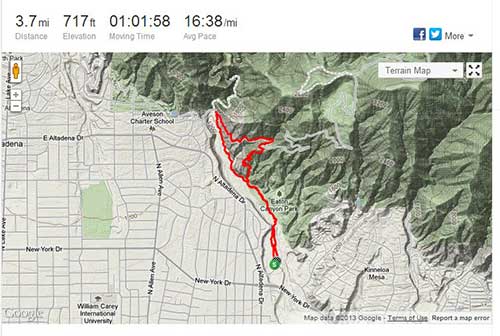
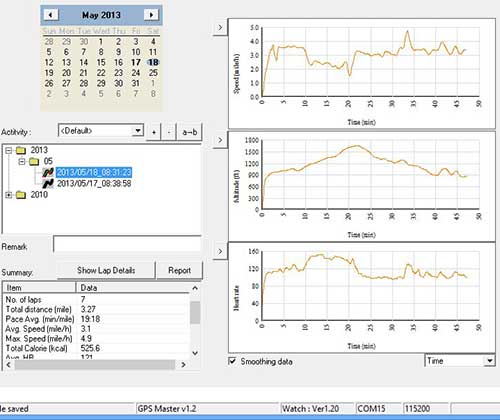
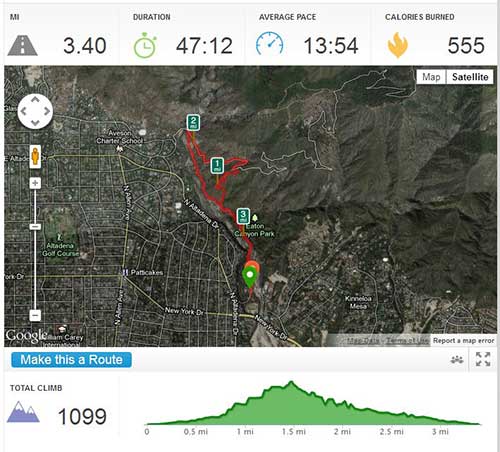
I went out for a hike today, with Strava and RunKeeper simultaneously running on my iPhone 4S, and the Pyle PSWGP405BK on my wrist.  Unfortunately, my wife had the Garmin Forerunner 10, so I have to use an old track, recorded last week, at approximately the same time of day. I know that it’s not an ideal comparison, but it will have to suffice for this article.  The route was in mountainous terrain, through a canyon … a much more challenging for a GPS than the flat route that I used in my last comparison.  Here’s RunKeeper’s take on the track: rk2 Strava’s take, running simultaneously on the iPhone with RunKeeper: strava Strava’s exported GPX file, imported to RunKeeper.com: stravaonrk What’s revealing is that given the same data, RunKeeper.com and Strava calculate essentially identical distances. This becomes important when we compare them to the Pyle. Strangely, RunKeeper.com shows a 13 second shorter duration, but identical average pace. The data downloaded from the Pyle and displayed in GPS Master are identical to what displayed on the watch: gpsmaster I used the Pyle’s included wireless heart rate monitor on this hike, and its connectivity was flawless during the entire recording.  I didn’t have to moisten the contacts in order to get a good reading, which was also nice. GPS Master shows my average heart rate was 121, and the max was 155.  The plots above are speed, altitude, and heart rate. The GPX file exported from GPS Master and uploaded to RunKeeper.com: pylerk A comparison table gleaned from the above data:

Distance (mi) Calories
Strava 3.7 N/A
Strava track on RunKeeper.com 3.71 600
RunKeeper 3.53 422
Pyle PSWGP405BK 3.27 526
Pyle PSWGP405BK track on RunKeeper.com 3.40 555

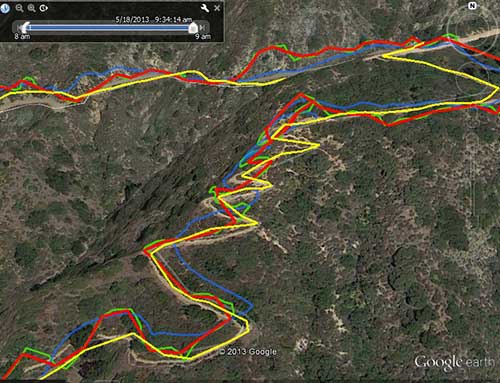
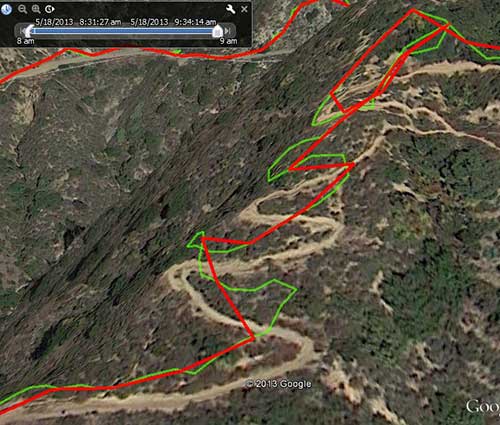
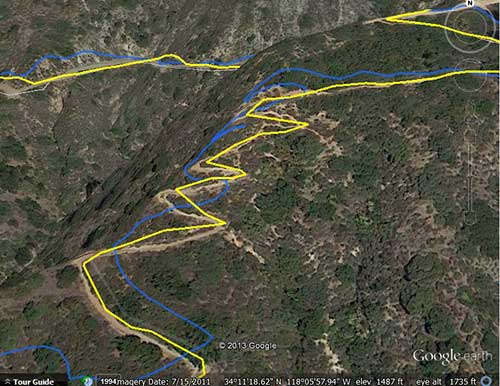
Once again, the Pyle PSWGP405BK and GPS Master displayed identical data, and the calculated distance was shorter than RunKeeper’s calculation using the Pyle’s exported GPX data.  I am convinced that the Pyle’s distance calculation is too conservative… 3.27mi vs 3.40mi calculated by RunKeeper.com on the same data.  Strava calculated 3.7 mi, which is too long, due to its poor filtering of the iPhone’s noisy data stream.  The Google Earth plots below will reveal more information.  Here is a Google Earth plot of Strava (green), RunKeeper (red), Pyle (blue), and Garmin FR10 (yellow) in the most challenging part of the track: all Strava (green) vs RunKeeper (red) stravark Viewing the track reveals why Strava calculated the longest distance.  Strava’s filtering algorithm is clearly inferior to RunKeeper’s in handling the iPhone’s poor quality location data stream. Pyle (blue) vs Garmin (yellow) fr10pyle Again, not an entirely valid comparison, since the Garmin track was recorded on a different outing, but it’s quite obvious that the Garmin outperforms the Pyle in accuracy.  The Garmin is the only device that was able to trace all of the switchbacks on the trail. Even in the less challenging parts of the track, the Pyle wanders a bit.  Still, the Pyle’s accuracy far exceeds that of the apps running on the iPhone. I am very disappointed that several reviewers said that the Pyle is very accurate.  Clearly, they didn’t do their homework.  The Pyle PSWGP405BK consistently calculates distances too short.  The Forerunner 10 kicks Pyle’s ass.  But the Pyle has a compass, navigation, and heart rate monitor for about the same price, and is not that bad, as long as you don’t mind the fact that it miscalculates distance, and have to use other software in order to extract the correct distances from its track. If you want to play with my data, you can download the tracks an view them in Google Earth yourself: eckml.zip Strava doesn’t export KML, but Google Earth can easily import its KML file.  I have also included full size image files of the screen shots I showed above.  In case you decide to compare the gory details of the tracks, when I got to the top of the winding trail above, I took a little break to fix my socks in a tree-covered area.  The FR10 track doesn’t show me deviating from the trail, because I didn’t take the detour during that outing.

Previous Related Post: Garmin Forerunner 10 vs Pyle PSWGP405BK

Next Related Post:  Accuracy of Pyle PSWGP405BK vs RunKeeper Revisited

Garmin Forerunner 10 vs Pyle PSWGP405BK

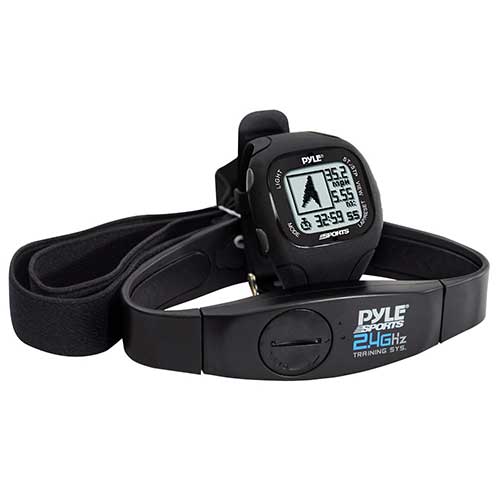
While I like my wife’s Garmin Forerunner 10 GPS watch, it’s irritating to me that it is a GPS device which is not capable of displaying GPS coordinates (latitude/longitude). This makes it essentially useless to use as a navigation device. After browsing around the web, I happened upon the Pyle PSWGP405BK.

PSWGP405BK

What struck me immediately was that for a list price of $150, it has a GPS, wireless heart rate monitor, digital compass, navigation functions, and is waterproof to 30m. Though there were few reviews of this GPS watch, they were generally favorable, and I was able to purchase a “used – good condition” unit from Amazon.com for $27 after getting a $50 credit for applying for their credit card, and got free 2-day shipping with a trial subscription to Amazon Prime.  When I received the unit, I was delighted to find that it was actually a never used, open box item.  The Pyle PSWGP405BK is essentially the same device as the Runtastic GPS watch, in slightly different packaging.  It is also available from several other companies with various names. As far as I can tell, the manufacturer is Latitude Limited, from Hong Kong.  It’s called the Nav Master II on their website.

This article is not meant to be a detailed comparison between the Garmin FR10 and the Pyle PSWGP405BK, but here are some of the differences:

  • Battery life with GPS on: Pyle – 8hr, Garmin – 5hr
  • Pyle has digital compass,navigation functions, tual time, and 5 alarms
  • Pyle is bigger and heavier
  • Pyle comes with clunky PC software, called GPS Master, which runs only on Windows.  Garmin interfaces to their Garmin Connect online service.
  • Pyle is much more customizable, and displays more types of data
  • Pyle has wireless HRM, Garmin doesn’t support HRM
  • Garmin is simpler, easier to use, at the expense of less functionality
  • Pyle takes a bit longer to get a GPS fix
  • Pyle outputs GPS track points at selectable interval in seconds, Garmin uses an adaptive approach, outputting GPS points at varying intervals depending on terrain

For me, the clunky PC software and lack of online service is a non-issue, because the included GPS Master software easily exports to various formats, such as GPX, TCX, KML, and even NMEA. Many of the phone softwares have online services which allow uploading of externally gathered GPS data, so I upload my Pyle tracks to RunKeeper.com. Today, I had a chance to wear both watches and simultaneously track a workout.

One minor inconvenience of the Pyle vs Garmin is that when you press the start button on the Garmin, it automatically waits for a GPS fix before it lets you start the workout. On the other hand, the Pyle will happily start the workout clock even when it doesn’t yet have a fix, so you must first start the GPS, wait for a fix, and then start the workout. Also, I found that the Pyle took a bit longer than the Garmin to get an initial GPS fix. Minor irritants, but how about GPS performance? The overlaid tracks below tell a big part of the story, Garmin in red, Pyle in blue:

fr10vspyle

The Garmin FR10’s track is noticeably more accurate, especially at the bottom of the plot. However, the Pyle PSWGP405BK is no slouch, it is still significantly more accurate than anything running on an iPhone. However, there is a significant bug in both the PSWGP405BK and the accompanying GPS Master software’s distance calculation. Here is a synopsis of the above route:

Distance (mi) Calories
Garmin Forerunner 10 2.43 153
Pyle PSWGP405BK 2.37 242
Pyle PSWGP405BK track on RunKeeper.com 2.44 247
Garmin Forerunner 10 track on RunKeeper.com 2.43 232

Notice how the Pyle came up short on its distance calculation: 2.37mi vs Garmin’s 2.43mi, a difference of .06mi.  However, the Pyle’s GPS track uploaded to RunKeeper.com comes up .01mi longer than the Garmin track.

Though the Pyle’s GPS accuracy is not as good as the Forerunner 10, and there is a glaring bug in its distance calculations, for the $27 I paid, it’s a keeper.  I like its extensive customizability and functionality, and I don’t mind the distance calculation bug, because I always upload the tracks to an online site for analysis. Please take my results with a grain of salt for now… I have only used the Pyle for one workout so far.  I have not seen any reviews which complain about the inaccuracy of its distance calculations, so maybe today’s track was just an aberration.

Update 2015-01-26: GPS Master’s exported GPX files don’t contain heart rate data and the only usable export format is CSV, which isn’t compatible with any software or website that I could find. Therefore, I have written two utilities, csv2gpx and csv2tcx, which you can use to convert the GPS Master CSV format to GPX and TCX files containing heart rate data. You can read more at: GPX and TCX output from GPS Master Software

Previous Related Post: Accuracy of Garmin FR10 vs RunKeeper vs MapMyRun

Next Related Post: Accuracy of Strava vs RunKeeper vs Pyle PSWGP405BK vs Garmin Forerunner 10

Accuracy of Garmin Forerunner 10 vs RunKeeper vs MapMyRun

Even though I’m the engineer in the family, my wife is more of a gadget freak than me. This year, she beceame interested in tracking her workouts.  She started out with a FitBit, and found that to be rather useless, so we returned that. Lately, she’s been into training for a half marathon, so we started using GPS workout tracking apps on an iPhone 5 and iPhone 4S.

We played with several different apps:  Kaiser EB Walk, Nike+, MapMyRun, NeoTreks, and Runkeeper. It’s interesting how you can run several apps simultaneously on an iPhone, and get wildly varying metrics from them.  The distance and pace vary quite a bit between apps, and I think the main reason is that the realtime geodata coming out of the iPhone is crap. Therefore, the app developers implement different filtering strategies on the data, leading to the different calculated metrics.

I find it amazing that the iPhone has an onboard GPS, accelerometer, and compass, and still manages to output such bad location data. Granted, the GPS antenna is quite small, but GPS watches are pretty small these days, and work much better. My guess is that Apple needs to do some work in iOS’ sensor data processing code. If only they would give us access to raw GPS data, rather than forcing us to use their garbage location API’s…

Following the recommendations of friends, my wife recently bought a Garmin Forerunner 10 (FR10) GPS watch.  I was skeptical that it was worth the $130, price tag, and was very interested in finding out how much better it would perform than the iPhone.  After using it for only a few days, I must say that I am very impressed.  Unlike my 10 year old Garmin eTrex GPS, the FR10 gets a fix very quickly, and manages to keep the fix even under moderate tree cover and in canyons.

Below, I will compare the simultaneously recorded outputs of RunKeeper, MapMyRun, and the FR10.  I chose RunKeeper and MapMyRun as the iPhone apps, because they offer easy access to the logged track data in the form of GPX files, and both websites allow you to upload/edit track data.  Note that the MapMyRun and RunKeeper data were recorded simultaneously on my iPhone, so they share the same sensor data.

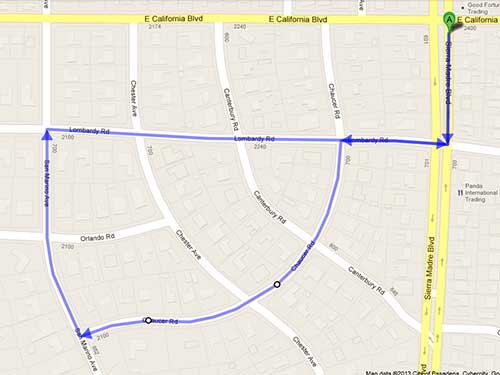
Route plotted on Google Maps:
google

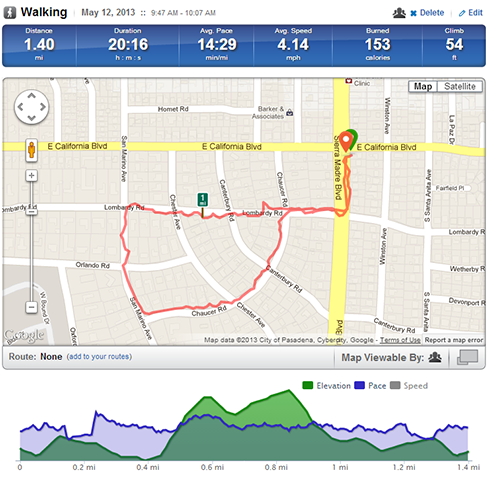
Calculated distance: 1.3mi

RunKeeper

rk

Despite the fact that the route is largely in a flat area, with very little tree cover, notice how the track wiggles and meanders.

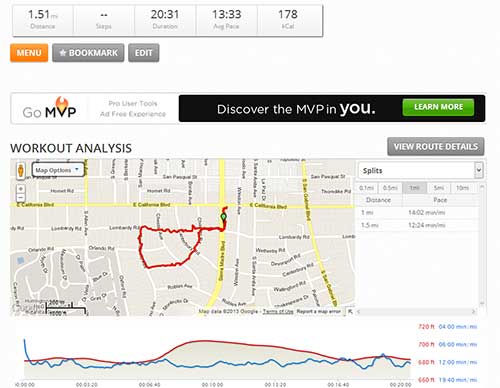
MapMyRun
mmr

The MapMyRun track, as expected, also wiggles quite a bit.

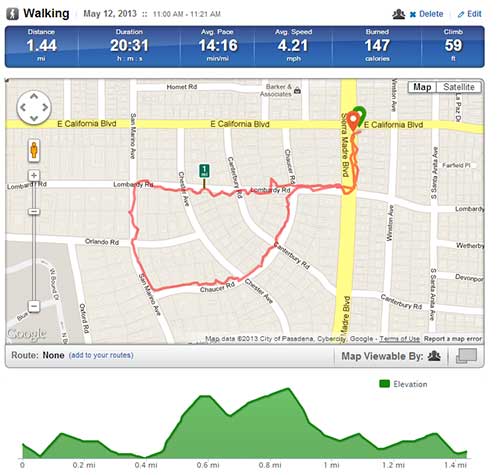
MapMyRun Track on RunKeeper.com
mmrrk

The above plot is taken from a GPX file exported from MapMyRun.com of the workout, as recorded by MapMyRun. Notice how RunKeeper.com, using the same track data, calculates the distance/pace/calories differently. I have found that MapMyRun consistently calculates the longest distances, and highest calorie count of the bunch.

Garmin FR10 on Garmin Connect
gc


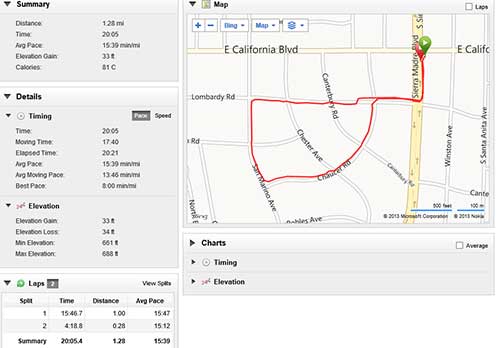
Note how the Garmin track is very clean and smooth, and tracks the roads reasonably closely.

Garmin FR10 Track on RunKeeper.com
fr10rk

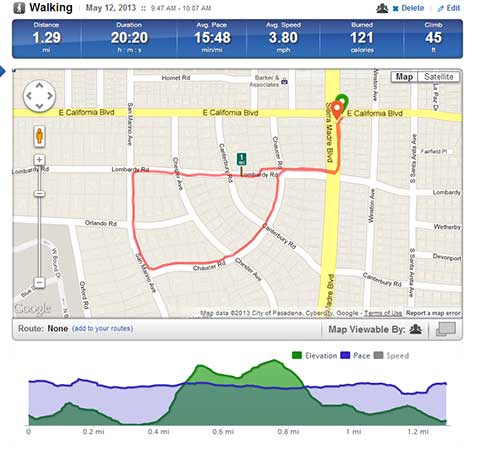
The above plot is of GPX data exported from Garmin Connect, and then uploaded to RunKeeper.com. The FR10 stores the track data in a proprietary FIT format, but luckily, their website is able to output GPX. Again, notice that RunKeeper.com used the same data, and yet, calculated different results.

Comparison

Distance (mi) Calories
RunKeeper 1.40 153
MapMyRun 1.51 178
FR10 (Garmin Connect) 1.28 81
MapMyRun Track on RunKeeper.com 1.44 147
Garmin FR10 Track on RunKeeper.com 1.29 121
Google Maps 1.3 N/A

Below are some data from a couple of other routes that I tested:

Euston Loop

Distance (mi) Calories
RunKeeper 2.53 279
MapMyRun 2.71 306
FR10 (Garmin Connect) 2.44 156
MapMyRun Track on RunKeeper.com 1.44 147
Google Maps 1.3 N/A
Manual Plot on RunKeeper.com 2.55 N/A

Winston Loop

Distance (mi) Calories
RunKeeper 1.79 186
MapMyRun 1.83 205
FR10 (Garmin Connect) 1.66 103
Manual Plot on RunKeeper.com 1.73 N/A


Discussion

While my sample size is small, some trends emerge.  The Garmin FR10 consistently calculates the shortest distances and calories.  MapMyRun consistently calculates the longest distances and highest calorie counts.  There is a difference between the calculation methodology between RunKeeper.com and MapMyRun.com, because given the same GPS track, MapMyRun calculates a longer distance (1.51 vs 1.44mi) and a higher calorie burn (147 vs 178cal) than RunKeeper.com.  On the other hand, Garmin Connect calculates shorter distances and calorie burns than RunKeeper.com, given the same track.

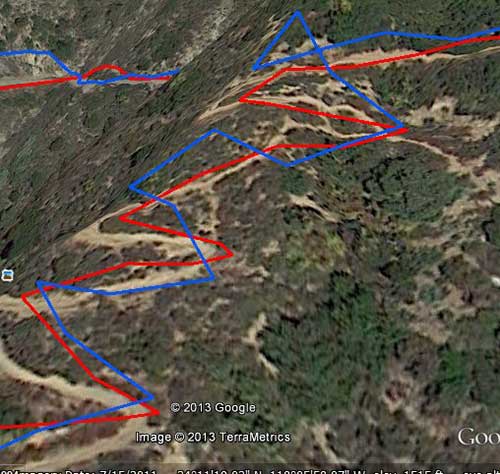
I have tested several other times, and the above trends hold.  Furthermore, the Garmin FR10 gives the smoothest, most accurate GPS track, especially when in a canyon, or under heavy tree cover. Below is a canyon track, Garmin FR10 in red, RunKeeper in blue:
ecrkfr

Notice the vastly improved accuracy of the Garmin FR10 track vs RunKeeper running on the iPhone.

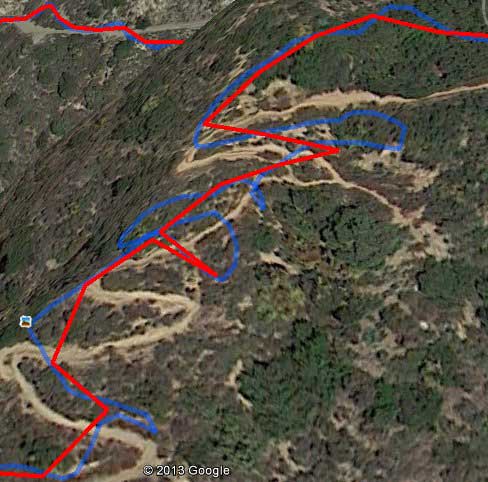
Finally, a canyon track which was recorded on my iPhone 4S, running RunKeeper and MapMyRun simultaneously. RunKeeper is in red, MapMyRun in blue:
ecrkmmr
The image above shows the vast differences which sometimes occur between the way that RunKeeper and MapMyRun interpret the same location data stream.  Neither track closely follows the actual path.  It’s pretty obvious that the Garmin FR10 is a worthwhile upgrade from using the iPhone as a sensor.

Next Related Post: Garmin Forerunner 10 vs Pyle PSWGP405BK
LeafCAN v2 Firmware in Alpha Test

I have been working on v2 of the LeafCAN firmware, which adds a whole slew of new screens, selectable via a rotary encoder.  The rotary encoder is connected to the AD0/1/2 pins on the expansion header of the LeafCAN V2 hardware.  The code is currently in alpha testing, and is available in the development branch of the LeafCAN github repository.  Be aware that the development branch is for my bleeding edge code, and at any time, the code there may be broken, as I continually checkpoint my code.  I will move it to the master branch when it’s ready to be released.

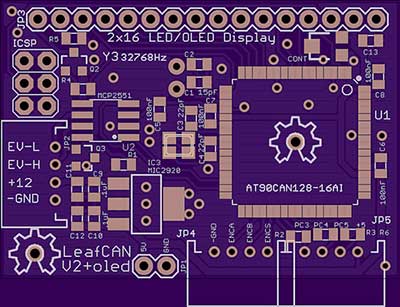
While I was developing the LeafCAN v2 firmware, I received a pleasant surprise in the mail from Barbouri (GregC) of the MyNissanLeaf forum.  He designed a PCB with 16×2 OLED display + RGB Led Rotary Encoder support,

v2o

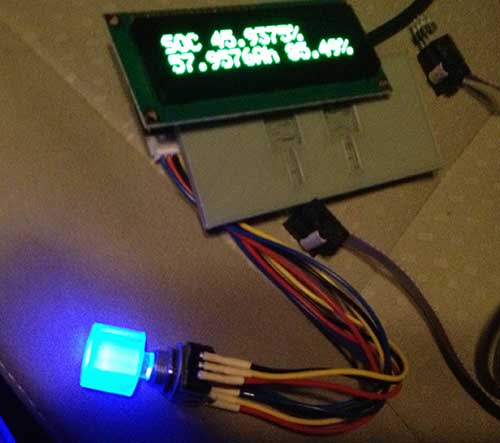
and sent me a completely assembled and tested rig.  I immediately added support for this new hardware variant into my working LeafCAN v2 firmware code.  The RGB knob is cool:

encoderled

but I am still pondering how best to use it. Currently, I have it blue when the car is idle, red when it’s consuming power, and green during regen.
Below is an overview of LeafCAN v2Alpha3. The various screens are selected by rotating the encoder knob. Some of the screens have different modes, selected via a press of the encoder knob. The first screen is the familiar info screen from LeafCAN v1.3:

mainscreen

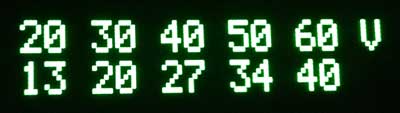
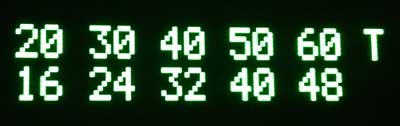
The top line from left to right is: kWh remaining/gids/fixed fuel bars, and the bottom line is: pack voltage/SOC%/instantaneous kW. The next screen is an idea lifted from Turbo3’s WattsLeft, the DTE (distance to event) screen:

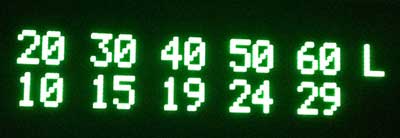
dtel

The top line shows various miles/kWh values, 2.0/3.0/4.0/5.0/6.0, and bottom line shows the distance in miles to the event, in this case, Low Battery.  Pressing the encoder button switches it to miles until Very Low Battery:

dtev

and pressing the button a third time shows miles until Turtle:

dtet

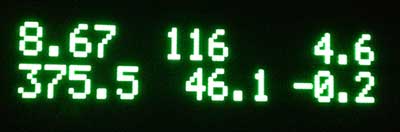
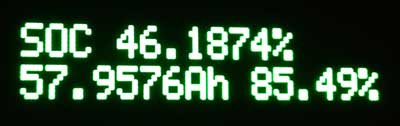
Thanks to a breakthrough in active can sampling, spearheaded by GregH and TickTock, I was able to implement the following new screens. The first one has on the top line, High Precision State of Charge (SOC)%.  The bottom line shows State of Charge (Ah), and possibly a Battery Health %.

soccap

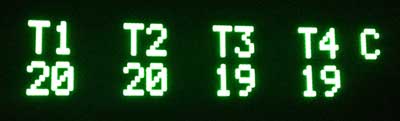
The next screen shows the 4 battery pack temperature sensors:

batttemp

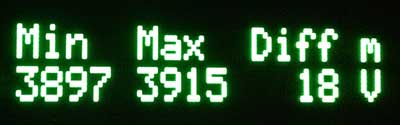
The units are selectable between Celcius and Fahrenheit with a press of the button. Finally, the last screen shows the minimum and maximum cell-pair voltages in mV, as well as their difference:

cellvolt

When an OLED is installed, the display now blanks after 5 sec of inactivity on the CAN bus. Pressing and holding the knob for a second wakes the display up for 5 sec.  When an LCD is installed, the press/hold turns on the backlight for 5 sec, instead.

I will be working towards finishing LeafCAN v2.0 in the coming weeks, and will announce its release here.

Barbouri and I are also collaborating on a dual-CAN bus version of the LeafCAN hardware, which will be able to monitor the Car-CAN as well as the EV-CAN on the Nissan Leaf. This will open up access to various information which is accessible only via the Car-CAN, such as friction brake actuation, steering angle, etc.

I would also like to point out that GregH has yet another cool Leaf CAN bus dash display in the works (only $80) that is worth checking out. Also, TickTock and garygid are working on the very fancy dual-touchscreen open-source CANary Project. Turbo3 has also figured out how to extract data from the Leaf Car-CAN using a cheap ELM-327 clone dongle and an Android phone. There is currently a flurry of CAN bus hacking on the Leaf.